
Для настройки программного модуля "Такси Навигатор" (далее ТН) необходимо нажать кнопку  на панели управления главного окна ТН.
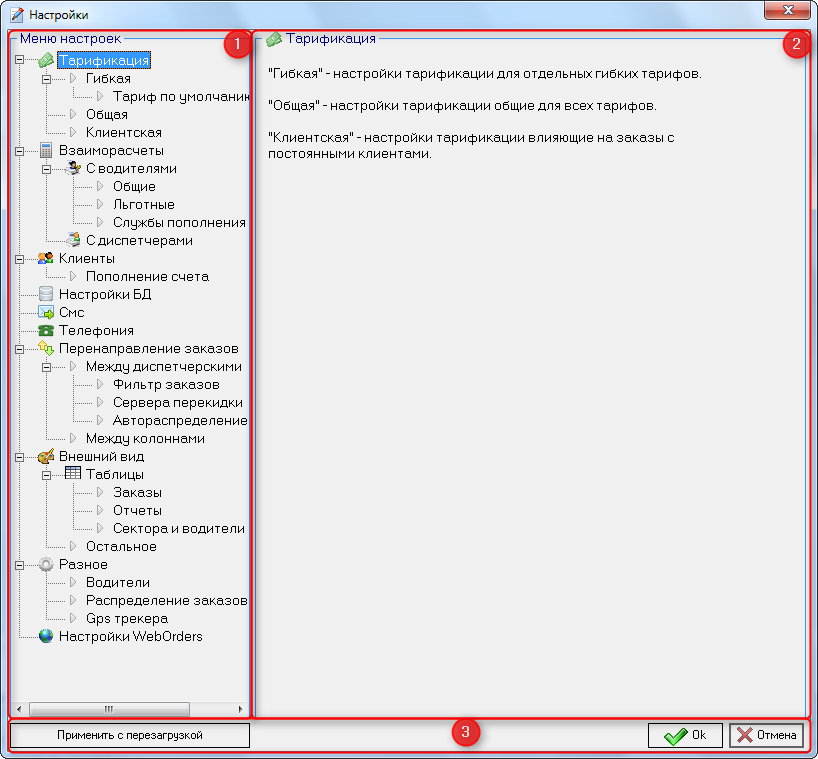
В области "1" на рисунке представлено "Меню настроек", в котором можно выбрать ту часть функционала комплекса ТН, которую необходимо настроить.
В области "2" на рисунке отображаются настройки выбранного в "Меню настроек" функционала.
В области "3" на рисунке есть следующие кнопки:
- Применить с перезагрузкой - при нажатии кнопки все измененные настройки сохранятся на сервере и при перезапуске всех диспетчерских мест к ним будут применены новые настройки.
- Ok - при нажатии кнопки в ТН открывается окно с подтверждением применения новых настроек на данном диспетчерском месте и предложением перезагрузить весь комплекс для применения настроек на всех диспетчерских местах.
- Отмена - при нажатии окно настроек закрывается без применения измененных настроек.
| Макрос генерирует HTML разметку |
|---|
 <div class="header">
        <h1>Настройки</h1>
        <h2>Настройки программы</h3>
    </div>
<div class="menu">
<div class="menu">


<div class="menu-container">
    <ul class="accordion">
        <li class="accordion_item">
            <input type="checkbox" class="accordion_toggle" id="toggle-01" hidden>
            <label class="accordion_trigger" for="toggle-01">How does cloud add-on pricing work?<>Тарификация</label>
            <div class="accordion_target">

<p>
                    Cloud pricing is subscription based. You are eligible for support and automatic version updates as long as your subscription<p><a href="https://https://docs.tn.in.ua/pages/viewpage.action?pageId=6816466><span>Гибкая</span></a> - настройка тарификации для отдельных гибких тарифов</p>
                <p>Тариф           is active.<по умолчанию</p>
                <p>When your subscription renews each month, you are automatically billed for host products and add-ons based
                    on the number of users in your instance.< <p>Общая - настройка тарификации для отдельных гибких тарифов</p>
                <p>If<p>Клиентская add-on pricing changesнастройка afterтарификации yourдля initialотдельных purchase, there's a 60-day grandfathering period during whichгибких тарифов</p>

         you can renew based on the old pricing.
                </p>
            </div>
        </li>
        <li class="accordion_item">
            <input type="checkbox" class="accordion_toggle" id="toggle-02" hidden>
            <label class="accordion_trigger" for="toggle-02">How do I determine my cloud pricing?</label>
            <div class="accordion_target">
                <p>
                    Add-ons are billed based on the number of users in your host product. JIRA Cloud add-ons are priced based on the maximum
                    users of the JIRA products on your instance. For example, if you have JIRA Software (50 users) and JIRA
                    Service Desk (10 agents) on the same instance, you pay the 50-user price for add-ons.Note: While this
                    add-on has features specific to JIRA Service Desk, the add-on is technically available across the whole
                    JIRA instance. Therefore the above guidelines for licensing across maximum users still apply.
                </p>
            </div>
        </li>
        <li class="accordion_item">
            <input type="checkbox" class="accordion_toggle" id="toggle-03" hidden>
            <label class="accordion_trigger" for="toggle-03">Do you offer academic, community, or open-source licenses?</label>
            <div class="accordion_target">
                <p>
                    Academic, community and open source licenses are not available for cloud add-ons.
                </p>
            </div>
        </li>
    </ul>
</div>
<style>
    .menu-container * {
        list-style: none;
        margin: 0;
        padding: 0;
    }

    .accordion_item {
        border-bottom: 1px solid #DFE1E6;
    }

    .accordion_trigger:hover {
        background-color: #F4F5F7;
    }

    .accordion_item:last-of-type {
        border-bottom: none;
    }

    .accordion_trigger {
        display: block;
        font-weight: normal;
        cursor: pointer;
        padding: 1.2em;
        color: #253858;
        font-weight: bold;
    }

    .accordion_toggle {
        position: absolute;
        display: none;
    }

    .accordion_target {
        border: 0;
        clip: rect(0 0 0 0);
        height: 1px;
        overflow: hidden;
        position: absolute;
        width: 1px;
    }

    .accordion_target p{
        margin-bottom: 1em;
    }

    .accordion_toggle:checked~.accordion_target {
        position: static;
        overflow: visible;
        clip: auto;
        padding: 0.2em 1.2em 0.2em 1.2em;
        width: auto;
        height: auto;
    }
</style>


</div>
    <style>
        .header {
            background-image: url("/download/attachments/6816069/bg_2.png");
    text-align: center;
            padding: 20px;
        }

        .header h1,

        .header span {
            color: #325F97;
        }


        .header h2,
        .header span {
            color: #444444;
        }


 </style>
|